


Fever: Events & Tickets review
 Analysis by GetAllApps
I see Fever as most useful when I know I want to go out but haven’t settled on what to do. Instead of beginning with a particular venue or performer, I can browse experiences in a city and see what catches my eye. That makes it a handy discovery app, especially for people who enjoy trying something beyond their usual dinner-and-a-movie routine. My main reservation is that an event feed can inspire ideas, but it cannot decide whether an outing actually suits my schedule, budget, or taste. I’d treat it as a starting point for planning, not a guarantee that every listing is a perfect match.
Good at turning a free evening into a plan
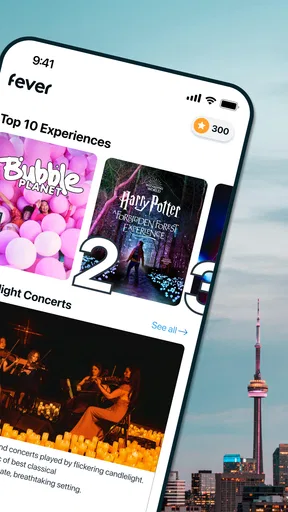
Fever: Events & Tickets is an events app from Fever Labs, built around finding things to do in cities including New York, Los Angeles, Chicago, Washington, DC, and Miami. It is free to download, and its focus is practical: browse local experiences, weigh up possibilities, and use the app as part of deciding where to spend an evening or weekend. The concept is strongest when I’m open-minded and would rather discover an option than search for one specific event by name.
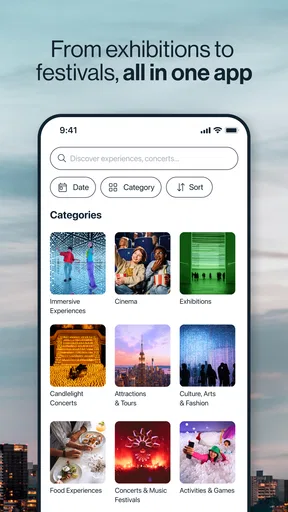
That distinction matters. A conventional ticketing app often works best when I already know the show, team, or venue I want. Fever is more appealing when my question is simply, “What could we do?” Browsing can make it easier to move from a vague idea to a shortlist, particularly when I’m visiting a city or arranging something with a friend whose preferences are not identical to mine. I can explore before committing to a plan, which is a small but useful difference from starting with a search engine and opening a string of venue pages.
The app has a 4.7 average from around 144,000 ratings, alongside roughly 4,100 written reviews, and it has passed 10 million installs. Those figures suggest that it has reached a broad audience, but they don’t tell me whether a particular event is right for me. For that, I still need to read the individual listing carefully and check the details that matter to my group.
Discovery is the real strength
The best reason to open Fever is the possibility of finding an experience I would not have thought to search for. Someone planning a familiar weekend might otherwise look up the same restaurants, cinemas, or venues they already know. An event-focused browsing app gives that person another route: scan options, notice an unfamiliar idea, and decide whether it sounds worth investigating. That is a genuine advantage over a ticket app that assumes the customer has already chosen what to attend.
For a realistic example, imagine I have a free Saturday evening in Chicago and a friend asks me to suggest something. Rather than sending a vague “What do you feel like?” message, I can browse first, narrow the possibilities to a couple of promising listings, and share those ideas for a quick decision. The useful part is not just seeing events; it is turning an open-ended planning conversation into a manageable choice. I would still check the date, location, and event description before making a commitment, but the app can help create the shortlist.
A second good use is planning around the mood of a group rather than around one person’s fixed preference. If nobody has a particular performance in mind, browsing can surface alternatives worth discussing. I find that more helpful than asking everyone to invent an idea from scratch. It can also be a useful first stop when visiting one of the cities it serves: use it to see what kinds of outings are available, then compare the most appealing options with the rest of the trip plan.
There is a trade-off, though. Discovery feeds reward browsing, and browsing can eat into the time I meant to spend choosing. I’d avoid scrolling without a simple constraint. Before opening the app, I would decide whether I’m looking for a particular day, a general type of outing, or something that suits a group. That small bit of preparation makes the selection process more purposeful and helps prevent an interesting listing from distracting me from the practical question of whether I can actually attend.
How I would use it before buying
I would treat each promising listing as a lead, not as a finished plan. First, I’d check that the event date and location work for everyone. Then I’d read the description for clues about the format and atmosphere, rather than relying on a title or promotional image to tell the whole story. If the group is undecided, I’d share a short list instead of asking everyone to browse independently. That keeps the conversation focused and makes it easier to compare options on the same basis.
For a group outing, the practical details deserve special attention. A venue that looks convenient to one person may be awkward for someone coming from another part of town, and a date that works for a couple may not work for a larger group. Fever can help with the discovery stage, but I would not assume that a promising event automatically solves those coordination problems. The app is most effective when one person uses it to gather candidates and the group makes the final choice together.
I would also separate “interesting” from “right for tonight.” A listing might be worth saving mentally for another occasion even if its timing or location is wrong for the current plan. That is an easy way to get value from browsing without feeling obliged to act on the first appealing option. If I’m planning a special outing, I’d make the decision only after checking the event-specific terms and details shown during the booking process. The event itself, rather than the general promise of discovery, should determine whether I buy.
Compared with searching social media, local guides, or venue calendars, Fever offers a more event-centred way to look for ideas. Those alternatives can be better when I need a deep account of one venue, want to see a friend’s recommendation, or already know exactly what I’m searching for. A venue’s own information is also a sensible place to verify the specifics of an outing. Fever’s value is different: it helps me browse possibilities across the city before I have settled on a destination.
Where the experience can fall short
The same discovery-first approach that makes Fever useful can make it less efficient for a decisive user. If I already know the event I want, an app organized around exploring options may feel like an extra step compared with going directly to the relevant venue or ticket seller. And if I’m looking for a comprehensive directory of every local activity, I would not assume that one discovery app covers everything I might find through local listings, community calendars, or direct searches.
Another limitation is that browsing does not remove uncertainty about fit. A short event description can help me decide whether to investigate further, but it may not answer every personal question: whether the atmosphere will suit a quiet evening, whether the group will enjoy the format, or whether the trip across town is worthwhile. I’d be cautious about treating an appealing presentation as a substitute for reading the event details. The more specific my needs are, the more useful it is to compare the listing with information from the venue or organizer before I commit.
It is also not ideal for someone who dislikes being presented with new options and simply wants the quickest route to a known booking. In that situation, the app’s central strength becomes unnecessary browsing. Likewise, a visitor with a tightly scheduled itinerary may get more from searching directly for an activity near a hotel or planned stop, rather than starting with a broad exploration of events around the city. Fever is a better fit for “help me find an idea” than for “I have already chosen; let me finish this quickly.”
Fever is rated Teen, so it is sensible for younger users and families to check the age guidance and suitability of each individual event rather than assuming that every listing is appropriate for every attendee. That is especially relevant when an outing involves a mixed-age group. A general app rating describes the app’s audience classification; it does not replace checking the rules and details for the specific experience being considered.
Who should give it a try
I’d recommend Fever to people who enjoy going out but want help getting past their usual shortlist. It can suit residents looking for a change of pace, visitors hoping to explore a city, and friends who need a few concrete suggestions before they can agree on a plan. It is particularly useful for the person in a group who tends to do the initial research and wants a convenient way to collect possibilities before everyone weighs in.
It is less compelling for someone who is loyal to a specific venue, already follows the performers or organizations they care about, or prefers to plan through established local calendars. Those users may find that a direct search is faster and gives them more context about the source. I’d also skip it as the sole planning tool when a group has strict requirements around timing, location, or event format. In those cases, use Fever to discover candidates if helpful, then verify the details elsewhere before making the plan final.
The app has been available since March 19, 2014, and its current version is 5.251.1. It requires Android 7.0 or later, which makes it accessible to many older Android devices, though anyone with a different device should check compatibility in the relevant app store. Since downloading it is free, trying it as a discovery tool has a low barrier. The more important decision is whether its browsing-led approach matches how I like to plan outings.
A useful scout, not a substitute for judgement
My verdict is positive, with a clear qualification: Fever is a strong scouting tool for city experiences, not a universal answer to event planning. I like it most when I have an open evening, want something more specific than “let’s go out,” and am willing to compare a few possibilities. Its broad appeal is reflected in its audience, but the real benefit is personal and simple: it can give me a better starting point than a blank search box.
I would keep it in my planning routine for idea-finding, especially when arranging a casual outing or exploring a city. I would not rely on it alone when I need exhaustive coverage, detailed venue context, or a fast purchase for an event I have already chosen. Browse with a purpose, check the listing before committing, and use other sources when the details matter. Under those conditions, Fever earns its place as a convenient way to discover what might make a free night feel less routine.
Pros and cons
Pros
- Explore concerts and local events based on your interests.
- Buy tickets directly through the app.
- Save favorite events to keep track of plans.
- Event details make it easier to compare options.
- Discover experiences beyond typical concerts and shows.
Cons
- Event availability can vary significantly by location.
- Popular events may sell out quickly.
- Some tickets include additional service fees.
- Refund options depend on the event's policy.
- Recommendations may feel less useful before you set preferences.


